Running the permeability property model
You complete the Permeability Property Modeling workflow by using the Run Model form (model > Permeability > Permeability Property Modeling > Run Model).
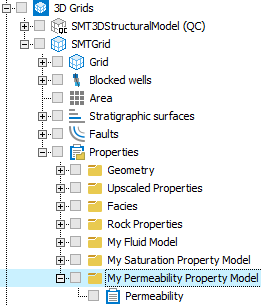
The resultant permeability grid property is stored in the JewelExplorer. click to enlarge
The resultant permeability grid property is stored in the JewelExplorer under your permeability property model folder (3D Grids > Your 3D Grid > Properties > Your Permeability Property Model). The permeability grid properties are read-only. If needed, you can duplicate them via the context menu in the JewelExplorer and then edit via the Property Calculator. You can use the permeability grid property as an input to your saturation property model or to your dynamic simulation.
To run your model
- On the Run Model form, select the permeability property model of interest from the Property model drop-down list.
- Click Apply to run the model and keep the form open, or click OK to run the model and close the form.